Step 1+2 – Creating a payment page & sending a request to retrieve transaction details (Iframe/Redirect)
When to Use These Functions?
Developers who wish to create a payment page for a customer after selecting products, or send a page for making a donation or subscribing to a service, can use the Create a new Iframe / Redirect page function.
After the transaction is completed, the transaction details can be retrieved using the Get the result of an Iframe / Redirect deal function.
The payment page is usually displayed after the checkout stage of the merchant’s website.
Common Use Cases for the Payment Page Creation Function:
This function allows you to create a landing page where the business can perform a variety of actions, including:
-
Standard charge
-
Deferred transaction with authorization hold
-
Charge and token creation
-
Token creation only
-
Token charge with 3DS authentication (requires direct integration model)
Additionally, the function includes options to input details for document generation and enables the launch of a payment screen using a physical device connected to the system.
Important:
Actions such as using tokens, generating documents, and deferred transactions require appropriate business models to function properly.
Required Models:
-
Low Profile – Required to generate a payment page via API.
-
Documents – Enables document generation.
-
Tokens – Enables token creation and usage.
For Developers:
You can use Postman for testing.
Accordingly, you can download the full API interface at once via Swagger, using the button shown in the image:
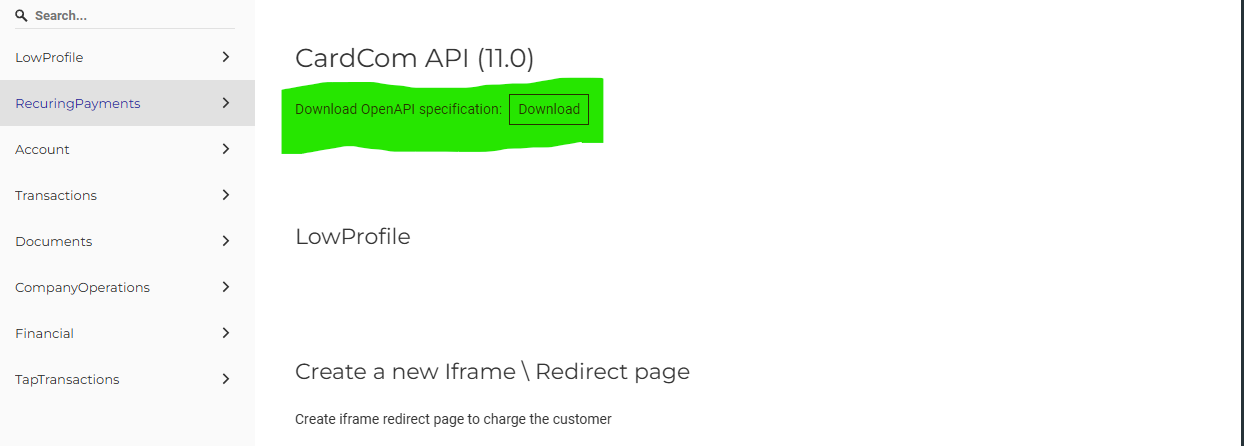
Here is also a link to download Postman:
Step One – Creating a Payment Page – Create a new Iframe / Redirect page
Below is a link to the function in JSON format.
Request Method – POST
Create a new Iframe \ Redirect page.
https://secure.cardcom.solutions/api/v11/LowProfile/Create
Guide:
-
Red parameter – Mandatory
-
Bold parameter – Recommended
-
Parameter that is neither red nor bold – Optional
Below is the parameter table.
| Number | Parameter Name | Example Values | Description |
|---|---|---|---|
| 1 | TerminalNumber | 1000 | The terminal performing the operation. This parameter must be obtained from the business. |
| 2 | ApiName | test2025 | Interface username. This parameter must be obtained from the business. |
| 3 | Operation | "ChargeOnly" - Charge only"ChargeAndCreateToken" - Charge and create token"CreateTokenOnly" - Create token only"SuspendedDeal" - Suspended transaction"Do3DSAndSubmit" - You can pass a token and immediately perform a 3DS transaction (customer must be present to enter verification code) | The type of operation the "Zahav Approval" system should perform. Note: For token creation and suspended transaction, there are additional optional parameters below. |
| 4 | ReturnValue | AA-1234 | Value to be sent to the payment system and returned to the WebHookUrl, up to 250 characters. (Usually the order number from the website ordering system) |
| 5 | Amount | 100.50 | The amount to be charged, can have up to two decimal places. |
| 6 | SuccessRedirectUrl | http://www.site.com/Success.html | The page to which the cardholder will be redirected after a successful transaction. Can also be set permanently in the system settings. * If using IFRAME, ensure the URL starts with https and not http. * Must be an external address, not localhost. |
| 7 | FailedRedirectUrl | http://www.site.com/Error.html | The page to which the cardholder will be redirected after a failed transaction. Can also be set permanently in the system settings. * If using IFRAME, ensure the URL starts with https and not http. * Must be an external address, not localhost. |
| 8 | WebHookUrl | https://webhook.site/... |
Webhook – Hidden Page (Reporting Page for Receiving Transaction Details) Important Notes:
|
| 9 | ProductName | Order number C101G | The product name shown to the user, max length 50 characters. If an invoice is generated, no need to send this; invoice details will be shown instead. |
| 10 | Language | he - Hebrew (design versions 5+6)en - English (design versions 5+6)ru - Russianar - Arabic | Language of the payment page.See more languages: Languages for low profile page.(Other languages supported only on design version 5) |
| 11 | ISOCoinId | 1 - Shekel2 - Dollar | Currency code for the transaction charge.For other currency codes - currency code list. |
Inside the object for the function Create a new Iframe / Redirect page, there is an attribute where you can define and edit additional settings within the created payment page.
Values of the UIDefinition object (12).
-
Red parameter – Mandatory
-
Bold parameter – Recommended
-
Parameter neither red nor bold – Optional
| Number | Parameter Name | Example Values | Description |
|---|---|---|---|
| 1 | IsHideCardOwnerName | (boolean) false \ true | Whether to hide the card owner’s name field. |
| 2 | CardOwnerNameValue | "Daniel Test" | String – Card owner’s name. |
| 3 | CardOwnerIdValue | NULL | ID number (e.g., national ID). |
| 4 | IsHideCardOwnerPhone | (boolean) false \ true | Whether to hide the phone number field. |
| 5 | CardOwnerPhoneValue | "0522222222" | String – Card owner’s phone number. |
| 6 | IsCardOwnerPhoneRequired | (boolean) false \ true | Whether the card owner’s phone number is required (if 3DS is enabled, phone number is mandatory regardless). |
| 7 | CardOwnerEmailValue | "test@t.com" | Card owner’s email. |
| 8 | IsHideCardOwnerEmail | (boolean) false \ true | Whether to hide the email field. |
| 9 | IsCardOwnerEmailRequired | (boolean) false \ true | Whether the customer’s email is required. |
| 10 | IsHideCardOwnerIdentityNumber | (boolean) false \ true | Whether to hide the ID number field (only if there is no requirement for ID). |
| 11 | IsHideCVV | (boolean) false \ true | Whether to hide the CVV field; used for recurring payment terminals where CVV is not mandatory. |
| 12 | CSSUrl | https://www.site.co.il/mycss.css | The URL will be injected into the payment page. Can be used only with approval from Cardcom. Mainly intended for website companies. |
| 13 | CustomFields | Array of objects | Custom fields array. Useful for passing additional transaction info for reporting or data collection.Id (integer) - from 1 up to 25.Value (string) - up to 50 characters.Each object contains:- Id: identifier of the custom field.- Value: value of the custom field. |
| 14 | GooglePayBtnDesign | Object with parameters | Google Pay button design:- ButtonColor (integer): 0 \ 1 \ 2- ButtonType (integer): 0 to 7- ButtonLocale (integer): 0 to 30 (not active)- ButtonWidth (string): e.g. "120"- ButtonHeight (string): e.g. "180"Design of Google Pay button is done only via custom design.ButtonColor - Google Pay button color.ButtonType - Button type.ButtonLocale - Not active.ButtonWidth - Width.ButtonHeight - Height. |
Values of the AdvancedDefinition object (13).
Red parameter – Required
Bold parameter – Recommended
Parameter that is neither red nor bold – Optional
| Number | Parameter Name | Example Values | Description |
|---|---|---|---|
| 1 | VirtualTerminal (object with inner parameters) |
IsEnable: true/false, IsOpenSum: true/false, ChargeOnSwipe: true/false
|
<
|
| 2 | JValidateType | 2 / 5 | Defines the type of validation for a Suspended Deal or Token Creation: 2 = Card validation only (J2) 5 = Authorization hold with the passed amount (J5) |
| 3 | IsAVSEnable | true / false | Whether to display AVS fields to the cardholder on the payment page. Intended for enhanced terminal security. Requires credit card company support. (Rarely used) |
| 4 | SapakMutav | "1234" | Customer number used in multi-acquirer (Rav-Mutav) configuration. |
| 5 | CreditType | 1 = Regular charge 6 = Credit (installments) |
If not passed, regular charge or standard installments will apply. Credit card companies usually enforce a minimum of 3 payments for Credit — adjusted automatically. Minimum amount may also apply — failing to meet it may redirect to the failure page. |
| 6 | IsRefundDeal | true / false | Indicates whether the transaction is a refund. |
| 7 | ApiPassword | "kzFKfohEvL6AOF8aMEJz" | API password — used for refunds and transaction cancellations. |
| 8 | ISOCoinName | ILS / USD / EUR | Currency name (used as an alternative to ISOCoinId which uses numeric codes). |
| 9 | MinNumOfPayments | 1 | Minimum number of installments. |
| 10 | MaxNumOfPayments | 12 | Maximum number of installments. |
| 11 | SelectedNumOfPayments | 5 | Default number of installments selected automatically. |
| 12 | FirstPayment | 50 | In installment transactions where the first payment is larger than the rest. (Not supported in Credit type transactions) |
| 13 | ConstPayment | 25 | Fixed payment amount. Combined with FirstPayment. Example: 100₪ total 3 payments: first = 50, remaining 2 = 25 each. Note: Not shown on the UI, calculated on server side — make sure to hide the breakdown section on the page. |
| 14 | Token | "4cf8e168-261e-4613-8d20-000332986b24" | For transactions using an existing token that requires 3DS authentication, pass the token here. Also requires Operation to be set to Do3DSAndSubmit. |
| 15 | CardExpirationYear | "2026" | Credit card expiry year (4 digits) — used with Do3DSAndSubmit. |
| 16 | CardExpirationMonth | "06" | Credit card expiry month (01–12) — used with Do3DSAndSubmit. |
| 17 | CardNumber | 4580000000000000 | Credit card number — used with Do3DSAndSubmit. |
| 18 | CVV | 758 | CVV number — used only for 3DS transactions (Do3DSAndSubmit). |
| 19 | ThreeDSecureState | "Auto" / "Enabled" / "Disabled" | Whether the transaction should go through 3D Secure: - Auto: Based on system settings in Cardcom.- Enabled: Force 3DS.- Disabled: Skip 3DS.Useful when triggering 3DS only for specific items or amounts. |
| 20 | ShouldOpenPinpadOnPageLoad | true / false | For physical card readers — whether to automatically open the credit card reader page on load. |
Values for Invoice in Case Document Model is Enabled – Object: Document (14)
Red parameter – Required
Bold parameter – Recommended
Regular (non-red, non-bold) parameter – Optional
| Number | Parameter Name | Example Values | Description |
|---|---|---|---|
| 1 | TypeToCreate | "Auto", "TaxInvoiceAndReceipt", "Receipt", "Quote", "Order", "TaxInvoice", ועוד | סוג המסמך להפקה – ניתן לבחור חשבונית מס/קבלה, הצעת מחיר, קבלה תרומה, תעודת משלוח ועוד בהתאם לצורך ולמה שמוגדר במערכת. |
| 2 | Name | מר טסט | שם הלקוח שיופיע במסמך. |
| 3 | TaxId | 040617640 | מספר תעודת זהות או מספר ח.פ של החברה. |
| 4 | israel@gmail.com | כתובת האימייל של הלקוח אליה יישלח המסמך. ניתן גם להוסיף מספר מיילים מופרדים ב- ;. |
|
| 5 | IsSendByEmail | true / false | האם לשלוח את המסמך באימייל. |
| 6 | AddressLine1 | Saharov 22 | כתובת שורה ראשונה. |
| 7 | AddressLine2 | P.O. 1234 | כתובת שורה שנייה. |
| 8 | City | Rishon-Le-Zion | עיר מגוריו של הלקוח. |
| 9 | Mobile | 03-9619611 | טלפון קווי. |
| 10 | Phone | 0549876543 | טלפון נייד. אם יש מודול SMS – הודעה תישלח למספר זה. |
| 11 | Comments | דוגמה: אחריות לשנה מיום החשבונית | הערות שיופיעו בתחתית המסמך. עד 250 תווים. |
| 12 | IsVatFree | true = מע"מ 0 / false = מע"מ 18 | האם המסמך הוא ללא מע"מ – מתאים ללקוחות מחו"ל. |
| 13 | DepartmentId | 123 | מזהה מחלקה – לשימוש בדוחות ובמערכת הנהלת חשבונות. |
| 14 | AdvancedDefinition | אובייקט עם שדות פנימיים | מאפשר להגדיר פתיחה ועדכון כרטיס לקוח אוטומטית, העברת מזהה ייחודי, שימוש במזהה חיצוני (ForeignKey), קישור למספר לקוח קיים ועוד. |
| 15 | Products | מערך של אובייקטים עם שדות כמו: ProductID, Description, Quantity, UnitCost ועוד | רשימת מוצרים במסמך: כולל קוד פריט, תיאור, כמות, מחיר יחידה, עלות שורה, והאם פטור ממע”מ. מתאים גם למספר פריטים. |
| 16 | ExternalId | מזהה חיצוני | מזהה מערכת חיצוני (ברמת המסמך בלבד). לא נשמר בכרטיס הלקוח. |
| 17 | IsAllowEditDocument | true / false | מאפשר ללקוח או לבית העסק לערוך פרטי מסמך מתוך דף התשלום (כמו שם, עיר, כתובת וכו’). |
Values for UTM Object (15)
-
Red parameter – Mandatory
-
Bold parameter – Recommended
-
Parameter that is neither red nor bold – Optional
| Number | Parameter Name | Example Values | Description |
|---|---|---|---|
| 1 | Source |
string or null (e.g., facebook) |
If additional parameters are passed to the success page, check the “Pass additional parameters” option in the interface. |
| 2 | Medium |
string or null (e.g., medium) |
If additional parameters are passed to the success page, check the “Pass additional parameters” option in the interface. |
| 3 | Campaign |
string or null (e.g., campaignNAME) |
If additional parameters are passed to the success page, check the “Pass additional parameters” option in the interface. |
| 4 | Content |
string or null (e.g., content) |
If additional parameters are passed to the success page, check the “Pass additional parameters” option in the interface. |
| 5 | Term |
string or null (e.g., term) |
If additional parameters are passed to the success page, check the “Pass additional parameters” option in the interface. |
RESPONSE of Create a new Iframe / Redirect page
After sending a POST to this function, the following values will be received in the RESPONSE:
| Number | Parameter Name | Example Values | Description |
|---|---|---|---|
| 1 | ResponseCode | 0 | 0 - Operation successful, otherwise error - development error. |
| 2 | Description | "The transaction was successful" | Description of the response; if a different response is received, the transaction failed. |
| 3 | LowProfileId | AA-BB-CC | Unique transaction code. |
| 4 | Url | "https://secure.cardcom.solutions/EA/LPC6/1000/17bdd03c-b8c2-48c4-b511-bcda7602f9c7?t=24" | Link to the payment page. |
| 5 | UrlToPayPal | "https://secure.cardcom.solutions/External/LowProfileRedirectToPayPal.aspx?TerminalNumber=1000&LowProfileCode=17bdd03c-b8c2-48c4-b511-bcda7602f9c7" | Link to the PayPal button. |
| 6 | UrlToBit | "https://secure.cardcom.solutions/api/LPC5/Bit?" | Link to the Bit button. |
Step 2 – Retrieving Transaction Details from the Server
Get the result of an Iframe / Redirect deal
Important
To maintain enhanced security and proper operational procedure, we do not use the information received directly from the report.
After receiving the report, we send a request, Get the result of an Iframe / Redirect deal, to our server to retrieve the transaction details from our server in order to verify the report’s validity.
Requesting the response data:
After fetching the data, you must mark in your system that the data has been retrieved to prevent repeated pulls of the same transaction.
There are cases where customers or crawlers revisit the success page or refresh the page.
This can cause duplicate transactions and orders in your system. If it is marked that the data was already retrieved, do not fetch it again.
The request is received as a GET request.
To verify if the transaction was successfully charged, check that the parameter ResponseCode == 0.
Notes:
-
Parameters in red are always sent; other parameters are sent only if they exist in the system. For example, if no token creation request was made, parameters related to the token will not be sent.
-
Additional parameters from credit card companies are also added.
-
Parameters are sent and received as a RESPONSE after sending the GET request.
-
Upon receiving a response for token creation, store in your database the token-related parameters as marked in the table.
-
It is recommended to store all data received in this response in your database.
Parameters table for the server request to retrieve transaction data again:
Request method: GET
Get the result of an Iframe \ Redirect deal
https://secure.cardcom.solutions/api/v11/LowProfile/GetLpResult
Below are the required parameters to send the request:
| Number | Parameter Name | Example Values | Description |
|---|---|---|---|
| 1 | TerminalNumber | 1000 | The terminal number that is executing the transaction. This identifies the specific device or point of sale performing the operation. |
| 2 | ApiName | test2025 | The API username used for authentication and authorization when accessing the interface. It identifies the client or system calling the API. |
| 3 | LowProfileId | AA-BB-CC | A unique identifier code for the transaction or profile. Used to track and reference the specific transaction across systems. |
Parameter table, received response:
| Number | Parameter Name | Example Values | Description |
|---|---|---|---|
| 1 | ResponseCode | 0 | 0 – Operation successful; otherwise error – development error. |
| 2 | Description | "The transaction was successful" | Description of the response. If a different response is received, the transaction was not successful. |
| 3 | TerminalNumber | 1000 | The terminal performing the operation. |
| 4 | LowProfileId | f47b241e-1861-4cf8-a9a2-bf0c05f9f36d | Unique transaction code. |
| 5 | TransactionId | 654354685 | Unique number of the transaction performed during credit charge. Response size can be Int64 / BigInt. |
| 6 | ReturnValue | AA-1234 | Value to pass to the payment system that will be returned to the IndicatorUrl, up to 250 characters. Typically, an order number. |
| 7 | Operation | "ChargeOnly" – charge only"ChargeAndCreateToken" – charge and create token"CreateTokenOnly" – create token only"SuspendedDeal" – suspended deal"Do3DSAndSubmit" – 3DS transaction requiring direct interface (PCI DSS compliant companies) | Type of operation performed in the system. |
| 11 | SuspendedDealId | 1234 | Suspended transaction number. |
| 12 | ExternalPaymentVector | NoneOrUnknown = 0 (system), PayPal = 10, ApplePay = 11, uPayBit = 12, 3DS=13, PayMeBit=14, GooglePay=15, EmvPinpad=100, EmvP400Verifon=101, IM30=102, 104=Bit cardcom | External source of the transaction, e.g., BIT, PayPal, ApplePay, GooglePay, etc. |
| 13 | Country | israel | Country billed in the document details. |
Values of UIValues (8).
| Number | Parameter Name | Example Values | Description |
|---|---|---|---|
| 8 | CardOwnerEmail | eli@gmail.com | Email address of the card owner. |
| 9 | CardOwnerName | Eli Cohen | Name of the card owner. |
| 10 | CardOwnerPhone | 0508855881 | Phone number of the card owner. |
| 11 | CardOwnerIdentityNumber | 040000000 | Identity number (ID) of the card owner. |
| 12 | NumOfPayments | 3 | Number of payments the customer chooses on the payment form. |
| 13 | CardYear | 28 | Card expiration year in YY format. |
| 14 | CardMonth | 6 | Card expiration month in MM format. |
| 15 | CustomFields | Array of objects | Custom fields sent from step 1.- Id: Identifier of the custom field.- Value: Value of the custom field. |
| 16 | IsAbroadCard | boolean - false/true | Indicates whether the credit card was issued abroad (i.e., a tourist card). |
Values of DocumentInfo (9).
| Description | Example Values | Parameter Name | Number |
|---|---|---|---|
| Response code for invoice creation | 0 – Success | ResponseCode | 1 |
| Description of the response; if different, the transaction failed | "The transaction was successful" | Description | 2 |
| Type of document issued |
"Auto" – Automatic, based on what's set in settings 3->4 "TaxInvoiceAndReceipt" – Tax Invoice and Receipt "TaxInvoiceAndReceiptRefund" – Credit Tax Invoice and Refund "Receipt" – Non-Profit Receipt "ReceiptRefund" – Non-Profit Refund Receipt (Refund of Funds) "Quote" – Price Quote "Order" – Order "OrderConfirmation" – Order Confirmation – from website "OrderConfirmationRefund" – Order Confirmation Credit – from website "DeliveryNote" – Delivery Note "DeliveryNoteRefund" – Return Note "ProformaInvoice" – Proforma Invoice "DemandForPayment" – Demand for Payment "DemandForPaymentRefund" – Cancellation of Demand for Payment "ProformaDealInvoice" – Proforma Deal Receipt "ProformaDealInvoiceRefund" – Proforma Deal Credit Receipt "TaxInvoice" – Tax Invoice "ProformaInvoiceRefund" – Proforma Invoice Credit "TaxInvoiceRefund" – Tax Invoice Credit "ReceiptForTaxInvoice" – Receipt (for Tax Invoice) "DonationReceipt" – Donation Receipt "DonationReceiptRefund" – Donation Receipt Credit (Refund of Funds) "ReceiptForTaxInvoiceRefund" – Customer Refund (Credit Receipt) |
DocumentType | 3 |
| Document number | 5000 | DocumentNumber | 4 |
| Customer account number | 1030 | AccountId | 5 |
| Customer accounting number, only if created or merged to customer account | 21451 | ForeignAccountNumber | 6 |
| Unique customer ID, only if created or merged to customer account | 1005412 | SiteUniqueId | 7 |
| Currently not working | URL of the document | DocumentUrl | 8 |
Values of TokenInfo (10).
| Description | Example Values | Parameter Name | Number |
|---|---|---|---|
| The token number; must be stored in the database. | 12F678C4-BC08-4607-ACF2-755FD7FCD3DE | Token | 1 |
| Token expiration date, same as card expiration; must be stored in the database. | YYYYMMDD | TokenExDate | 2 |
| Card expiration year; must be stored in the database when creating the token. | 2021 | CardYear | 3 |
| Card expiration month; must be stored in the database when creating the token. | 12 | CardMonth | 4 |
| One-time approval number received when creating a token with J5 verification; must be stored for future charges with the capture. | 12345 | TokenApprovalNumber | 5 |
| Identity number (ID) of the card owner. | 213654987 | CardOwnerIdentityNumber | 6 |
Values of TransactionInfo (12).
| Description | Example Values | Parameter Name | Number |
|---|---|---|---|
| Response code | 0 - Success700 & 701 - J2 / J5 Transaction Success0 - Operation OK, otherwise error - Development error. | ResponseCode | 1 |
| Response description; if different, the transaction failed | "The transaction was successful" | Description | 2 |
| Internal transaction number | 203990118 | TransactionId | 3 |
| Terminal number | 1001 | TerminalNumber | 4 |
| Transaction amount | 500 | Amount | 5 |
| Currency code | 1 - Shekel2 - DollarFor more currency codes - currency code list | CoinId | 6 |
| Receipt coupon number; sometimes used for adjustments | 38022395 | CouponNumber | 7 |
| Transaction creation date | "2025-03-12T08:46:45" | CreateDate | 8 |
| Last 4 digits of credit card (integer) | 5796 | Last4CardDigits | 9 |
| Last 4 digits of credit card (string) | "5796" | Last4CardDigitsString | 10 |
| First 6 digits of credit card | 440066 | FirstCardDigits | 11 |
| Type of check on card | 0 - Default according to credit card company settings2 - Check digit verification only5 - Approval request to credit card companiesJ parameter, type of check to perform on the card | JParameter | 12 |
| Card expiration month | 12 | CardMonth | 13 |
| Card expiration year | 2021 | CardYear | 14 |
| Approval number; essential for J5 transactions. Needed for later charging of the reserved amount | 009491B | ApprovalNumber | 15 |
| Amount of first payment | 50.00 | FirstPaymentAmount | 16 |
| Amount of each additional payment | 20.00 | ConstPaymentAmount | 17 |
| Number of payments | 5 | NumberOfPayments | 18 |
| Card type | "Israeli" | CardInfo | 19 |
| Card owner name | "daniel" | CardOwnerName | 20 |
| Card owner phone number | "0522222222" | CardOwnerPhone | 21 |
| Card owner email | "test@gmail.com" | CardOwnerEmail | 22 |
| Card owner ID number | "213654987" | CardOwnerIdentityNumber | 23 |
| Token number; must be stored in the database | "4cf8e168-261e-4613-8d20-000332986b24" | Token | 24 |
| Card name | "Visa Regular" | CardName | 25 |
| Customer number for Rab Mutav | 1234 | SapakMutav | 26 |
| Unique transaction identifier | "21121517002429612920744" | Uid | 27 |
| Deposit/concentration number | "156874" | ConcentrationNumber | 28 |
| Document number | 300394 | DocumentNumber | 29 |
| Document type |
"Auto" – Automatic, based on what's set in settings 3->4 "TaxInvoiceAndReceipt" – Tax Invoice and Receipt "TaxInvoiceAndReceiptRefund" – Credit Tax Invoice and Refund "Receipt" – Non-Profit Receipt "ReceiptRefund" – Non-Profit Refund Receipt (Refund of Funds) "Quote" – Price Quote "Order" – Order "OrderConfirmation" – Order Confirmation – from website "OrderConfirmationRefund" – Order Confirmation Credit – from website "DeliveryNote" – Delivery Note "DeliveryNoteRefund" – Return Note "ProformaInvoice" – Proforma Invoice "DemandForPayment" – Demand for Payment "DemandForPaymentRefund" – Cancellation of Demand for Payment "ProformaDealInvoice" – Proforma Deal Receipt "ProformaDealInvoiceRefund" – Proforma Deal Credit Receipt "TaxInvoice" – Tax Invoice "ProformaInvoiceRefund" – Proforma Invoice Credit "TaxInvoiceRefund" – Tax Invoice Credit "ReceiptForTaxInvoice" – Receipt (for Tax Invoice) "DonationReceipt" – Donation Receipt "DonationReceiptRefund" – Donation Receipt Credit (Refund of Funds) "ReceiptForTaxInvoiceRefund" – Customer Refund (Credit Receipt) |
DocumentType | 30 |
| Credit card company identification number | "500301575449" | Rrn | 31 |
| Card brand | "PrivateCard", "MasterCard", "Visa", "Maestro", "AmericanExpress", "Isracard", "JBC", "Discover", "Diners" | Brand | 32 |
| Acquiring company | "Unknown", "Isracard", "CAL", "Diners", "AmericanExpress", "Laumicard", "CardCom", "PayPal", "Upay", "PayMe" | Acquire | 33 |
| Issuing company | "NonIsrael", "Isracard", "CAL", "Diners", "AmericanExpress", "JCB", "Laumicard" | Issuer | 34 |
| Credit type - regular charge / payment / credit / factoring | "Unknown", "Standard", "SpecialCredits", "ImmediateCharge", "CreditClub", "SuperCredit", "InstallmentCredit", "Payments", "ClubPayments" | PaymentType | 35 |
| Transaction source - online, EMV, phone, etc. | "MagneticStrip", "SelfService", "GasStationSelfService", "Contactless", "EmvContactless", "MobileContactless", "EmvMobileContactless", "MobileNumber", "Emv", "Phone", "SignatureOnly", "Internet", "Fallback", "EmptyCandidateList" | CardNumberEntryMode | 36 |
| Transaction type and source - cancel, charge, standing order, refund | "Information", "Debit", "Discharge", "ForcedCharge", "CashBack", "CashTransaction", "Recurring", "BalanceQuery", "Cancel", "Refund", "Recharge" | DealType | 37 |
| Whether this was a refund transaction | boolean - true / false | IsRefund | 38 |
| Document URL | URL of the document (currently not working) | DocumentUrl | 39 |
| Values of custom fields | Array of objects.Id - 20Value - "value" | CustomFields | 40 |
| Whether the card was issued abroad | boolean (true / false) | IsAbroadCard | 41 |
Values for UTM (an object containing parameters)
| Description | Values | Parameter |
|---|---|---|
| An additional parameter that is passed to the success page. To pass, check the box next to the interface — Pass additional parameters. | string או null, example: facebook | Source |
| An additional parameter that is passed to the success page. To pass, check the box next to the interface — Pass additional parameters. | string או null, example: medium | Medium |
| An additional parameter that is passed to the success page. To pass, check the box next to the interface — Pass additional parameters. | string או null, example: campaignNAME | Campaign |
| An additional parameter that is passed to the success page. To pass, check the box next to the interface — Pass additional parameters. | string או null, example: content | Content |
| An additional parameter that is passed to the success page. To pass, check the box next to the interface — Pass additional parameters. | string או null, example: term | Term |
Here are example codes for steps 1 + 2.
Creating a payment page only (Step 1):
  {

   "TerminalNumber": 1000,

   "ApiName": "test2025",

   "Amount": 10.5,

   "Operation":"ChargeOnly",

   "SuccessRedirectUrl": "https://www.google.com",

   "FailedRedirectUrl": "https://www.yahoo.com",

   "WebHookUrl": "https://webhook.site/c208ee79-0d2a-43b2-a52a-0860e9c86a0d",

  }
Creating a payment page with document issuance (Step 1):
   {

    "TerminalNumber": 1000,

    "ApiName": "test2025",

    "ReturnValue": "Z12332X",

    "Amount": 10.5,

    "Language": "en",

    "Operation":"ChargeAndCreateToken",

    "ProductName":"Order number C101G",

    "SuccessRedirectUrl": "https://www.google.com",

    "FailedRedirectUrl": "https://www.yahoo.com",

    "WebHookUrl": "https://webhook.site/c208ee79-0d2a-43b2-a52a-0860e9c86a0d",

    "ISOCoinId" : 1,

    "Document": {

      "DocumentTypeToCreate":"Order",

      "Name": "test client",

      "Email": "test@testDomain.com",

      "Products": [

        {

          "Description": "my item to sell",

          "UnitCost": 10.5

        }

      ]

    }

   }
GET request (Step 2):
    {

     "TerminalNumber": 1000,

     "ApiName": "test2025",

     "LowProfileId": "9e26b925-9040-4f06-8644-8f92e036f3f8"

    }
The RESPONSE:
     {

        "ResponseCode": 0,

        "Description": "The transaction was successful",

        "TerminalNumber": 1000,

        "LowProfileId": "8c92820a-2f6f-4120-a699-ab1969b2f78b",

        "TranzactionId": 209413394,

        "ReturnValue": "Z12332X",

        "Operation": "ChargeAndCreateToken",

        "UIValues": {

            "CardOwnerEmail": "testsite@test.co.il",

            "CardOwnerName": "Card Owner",

            "CardOwnerPhone": "039436100",

            "CardOwnerIdentityNumber": "040617649",

            "NumOfPayments": 1,

            "CardYear": 2027,

            "CardMonth": 10,

            "CustomFields": [

                {

                    "Id": 1,

                    "Value": "דגכדגכשע"

                },

                {

                    "Id": 3,

                    "Value": "1231231"

                }

            ],

            "IsAbroadCard": false

        },

        "DocumentInfo": {

            "ResponseCode": 0,

            "Description": "The transaction was successful",

            "DocumentType": "TaxInvoiceAndReceipt",

            "DocumentNumber": 593032,

            "AccountId": 0,

            "ForeignAccountNumber": null,

            "SiteUniqueId": null,

            "DocumentUrl": null

        },

        "TokenInfo": {

            "Token": "4cf8e168-261e-4613-8d20-000332986b24",

            "TokenExDate": "20271101",

            "CardYear": 2027,

            "CardMonth": 10,

            "TokenApprovalNumber": "12345",

            "CardOwnerIdentityNumber": "040617649"

        },

        "SuspendedInfo": null,

        "TranzactionInfo": {

            "ResponseCode": 0,

            "Description": "The transaction was successful",

            "TranzactionId": 209413394,

            "TerminalNumber": 1000,

            "Amount": 10.5,

            "CoinId": 1,

            "CouponNumber": "38038259",

            "CreateDate": "2025-05-06T10:48:21",

            "Last4CardDigits": 0,

            "Last4CardDigitsString": "0000",

            "FirstCardDigits": 458000,

            "JParameter": "0",

            "CardMonth": 10,

            "CardYear": 27,

            "ApprovalNumber": "12345",

            "FirstPaymentAmount": 0.0,

            "ConstPaymentAmount": 0.0,

            "NumberOfPayments": 1,

            "CardInfo": "Israeli",

            "CardOwnerName": "Card Owner",

            "CardOwnerPhone": "039436100",

            "CardOwnerEmail": "testsite@test.co.il",

            "CardOwnerIdentityNumber": "040617649",

            "Token": "4cf8e168-261e-4613-8d20-000332986b24",

            "CardName": "ויזה רגיל",

            "SapakMutav": "",

            "Uid": "21121517002429612920744",

            "ConcentrationNumber": null,

            "DocumentNumber": 593032,

            "DocumentType": "TaxInvoiceAndReceipt",

            "Rrn": "",

            "Brand": "Visa",

            "Acquire": "Laumicard",

            "Issuer": "CAL",

            "PaymentType": "Standard",

            "CardNumberEntryMode": "Phone",

            "DealType": "Debit",

            "IsRefund": false,

            "DocumentUrl": null,

            "CustomFields": [

                {

                    "Id": 1,

                    "Value":"דגכדגכשע"

                },

                {

                    "Id":  3,

                    "Value":  "1231231"

                }

            ],

            "IsAbroadCard": false,

            "IssuerAuthCodeDescription": "Approved by the issuing company via a request for approval without transaction"

        },

        "ExternalPaymentVector": "NoneOrUnknown",

        "Country": "IL",

        "UTM": null,

        "IssuerAuthCodeDescription": "Approved by the  issuing   company    via     a request for approval without transaction"

     }
Link to the article for Step 3 – Charging Tokens.