WEBHOOK – Invoice: Receiving notifications about document creation to an external system – API
Invoice: Receiving notifications about document creation to an external system
In the Gold Approval system, it is possible to receive notifications to an external system for every document generated by the system.
Important: The parameters are optional and will only appear in the notification if they are included in the request.
Settings
To enable this option, navigate in the admin system menus to:
Settings -> 3. Documents -> 4. Document Settings in Interfaces
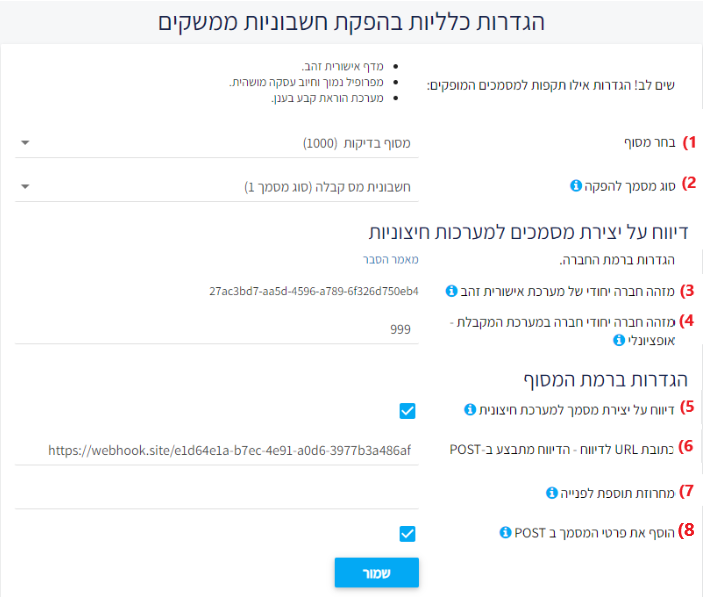
Details of the options described on the settings page:
Select the terminal for which the settings are being configured.
You can choose the type of document to be generated during an automatic document creation.
A unique company identifier in the Cardcom system will be sent to your server when reporting a new document. – Unique company ID for the “Ishorit Zahav” approval system
Unique company ID – cannot be changed
This value will be added to the request under the name: BillGoldCompID
Note! This parameter is uniform for all terminals!Optional – a unique identifier of your company on the target server – Unique company ID
If not empty, this value will be added to the request under the name: ExternalCompID
Note! This parameter is uniform for all terminals!Enable reporting to an external server for the selected terminal – Reporting document creation to an external system
Whether to report to an external system when creating a document. Suitable when you want to report document generation to a third-party system.
Note! This parameter is set at the terminal level!URL for POST request with the document details.
Additional parameters to add to the request – string appended to the request
You can add data to the request, for example:
Term=1234&secret=abcs
These parameters will be added to the request.
Note! URL encoding is NOT performed for these values, so do not include special characters such as spaces, Hebrew, etc.
It is recommended to use only English letters and numbers.Include document details in the POST report – document details will be received in the POST instead of being fetched from the Cardcom server
Note! This parameter is set at the terminal level!
The parameters received at the reporting URL (6) via POST.
| # | Parameter | Example Values | Description |
|---|---|---|---|
| 1 | BillGoldCompID | 27ac3bd7-aa5d-4596-a789-6f326d750eb4 | Unique company ID in Cardcom (item 3) |
| 2 | DocType | 1 - Tax Invoice Receipt3 - Nonprofit Receipt101 - Website Order | Type of generated document |
| 3 | DocNumber | 1006 | Document number |
| 5 | ExternalCompID | DemoCompany | External company ID as entered (item 4) |
| 6 | Additional parameters (from item 7) | data=1&otherInfo=2 | Additional parameters passed to the request |
| 7 | ResponseCode | 0 | Operation completed successfully |
| 8 | InvoiceDefHe_InvoiceComments | תודה שרכשת נשמח לשמוע | Document comments defined at the interface level (Hebrew) |
| 9 | InvoiceDefHe_Name | אבי מזגנים בע"מ | Company name in the Cardcom system (Hebrew) |
| 10 | InvoiceDefHe_Line1 | חולון | Address line 1 defined in the system (Hebrew) |
| 11 | InvoiceDefHe_Line2 | הבקעה | Address line 2 defined in the system (Hebrew) |
| 12 | InvoiceDefHe_Line3 | 23 | Address line 3 defined in the system (Hebrew) |
| 13 | InvoiceDefEn_InvoiceComments | thank you for your purchase | Document comments defined in English interface |
| 14 | InvoiceDefEn_Name | Avi Father of Air Conditioners LTD | Company name in English in Cardcom |
| 15 | InvoiceDefEn_Line1 | Holon | Address line 1 in English as defined in system |
| 16 | InvoiceDefEn_Line2 | Ha-Bika | Address line 2 in English as defined in system |
| 17 | InvoiceDefEn_Line3 | 23 | Address line 3 in English as defined in system |
| 18 | CashNIS | 150 | Cash payment amount recorded in the document |
| 19 | ExtReadInvoiceHead_CustName | Jhonas | Customer name on the document |
| 20 | ExtReadInvoiceHead_CustAddresLine1 | סחרוב 22 | Customer address line 1 (Hebrew) |
| 21 | ExtReadInvoiceHead_CustAddresLine2 | בניין 2 | Customer address line 2 (Hebrew) |
| 22 | ExtReadInvoiceHead_CustCity | Vegas | Customer city on the document |
| 23 | ExtReadInvoiceHead_CustLinePH | 03-4572354 | Customer landline phone number |
| 24 | ExtReadInvoiceHead_CustMobilePH | 054-7654221 | Customer mobile phone number |
| 25 | ExtReadInvoiceHead_CompID | 435128744 | Customer ID number / company registration number |
| 26 | ExtReadInvoiceHead_Languge | Hebrew | Document language |
| 27 | ExtReadInvoiceHead_Comments | thank you for your purchase | Comments added programmatically |
| 28 | ExtReadInvoiceHead_CoinID | 1 - Shekel2 - Dollar | Selected currency typeSee full list in currency codes |
| 29 | ExtReadInvoiceHead_Email | test@gmail.com | Customer email |
| 30 | ExtReadInvoiceHead_SendByEmail | True / False | Whether to email the document to the customer |
| 31 | ExtReadInvoiceHead_CustomerNumber | 8539 | Customer number generated in Cardcom |
| 32 | ExtReadInvoiceHead_Discount | 0.0 | Discount amount set |
| 33 | ExtReadInvoiceHead_InvoiceDate | 23.1.2023 | Document issue date (records even if backdated from transaction date) |
| 34 | ExtReadInvoiceHead_InvoiceType | 1 - Tax Receipt, etc. | Type of document to be issuedFull list available |
| 35 | ExtReadInvoiceHead_InvoiceNumber | 511284 | Issued invoice number |
| 36 | ExtReadInvoiceHead_TerminalNumber | 1000 | Terminal number that executed the operation |
| 37 | ExtReadInvoiceHead_TotalIncludeVAT | 150 | Total amount including VAT |
| 38 | ExtReadInvoiceHead_TotalNoVat | 128.21 | Total amount excluding VAT |
| 39 | ExtReadInvoiceHead_TotalVatFree | 0.0 | VAT-exempt amount |
| 40 | ExtReadInvoiceHead_VAT | 0.17 | VAT rate applied |
| 41 | ExtReadInvoiceHead_VATOnly | 21.79 | VAT amount charged |
| 42 | ExtReadInvoiceHead_IsOpen | True / False | Whether the document is open or closed |
| 43 | ExtReadInvoiceHead_DepartmentID | 36 | Department number under which the document was issuedFull list available |
| # | Parameter | Example Value | Description |
|---|---|---|---|
| 44 | ExtReadInvoiceHead_TotalIncludeVATNIS | 150 | Total amount including VAT in NIS (Israeli Shekel) |
| 45 | ExtReadInvoiceHead_TotalNoVatNIS | 128.21 | Total amount excluding VAT in NIS |
| 46 | ExtReadInvoiceHead_TotalVatFreeNIS | 0.0 | VAT-exempt amount in NIS |
| 47 | ExtReadInvoiceHead_VATOnlyNIS | 21.79 | VAT amount charged in NIS |
Line-level document parameters:
| # | Parameter | Example Value | Description |
|---|---|---|---|
| 48 | TotalExtReadInvoiceLines | 1 | Number of lines in the document |
| 49 | ExtReadInvoiceLines_CostNoVat | 128.21 | Total cost excluding VAT for the product line |
| 50 | ExtReadInvoiceLines_Description | test product | Product name on the line |
| 51 | ExtReadInvoiceLines_InvoiceNumber | 511284 | Document number that was issued |
| 52 | ExtReadInvoiceLines_ProductID | GLSY | Product catalog number (SKU) |
| 53 | ExtReadInvoiceLines_Quantity | 1 | Product quantity |
| 54 | ExtReadInvoiceLines_TotalLineCostIncludeVAT | 150 | Total cost including VAT for the line |
| 56 | ExtReadInvoiceLines_TotalLineCostNoVat | 128.21 | Total cost excluding VAT for the line |
| 57 | ExtReadInvoiceLines_TotalLineCostVATOnly | 21.79 | VAT amount charged on the line |
| 58 | ExtReadInvoiceHead_VAT | 0.17 | VAT percentage applied |
| 59 | ExtReadInvoiceHead.ExternalId | Order 1234 | External transaction ID |
| 60 | ExtReadInvoiceHead_RoundUp | 0.01 | Rounding discount applied to the total |
Example of parameters that will be received:
BillGoldCompID=27ac3bd7-aa5d-4596-a789-6f326d750eb4&DocType=1&DocNumber=1006&ExternalCompID=DemoCompany&data=1&otherInfo=2
Payment method:
Credit Card:
Parameter table – Data received from credit card companies:
In addition to the internal data from the Ishurit Zahav (Golden Authorization) clearing system, when processing a credit card charge, there are additional data elements that are received directly from the credit card companies.
Notes:
The parameters are passed only if they exist in the system and a request was made to the credit card companies.
The parameters are dynamic; additional fields may be added in the future.
| # | Parameter | Example Value(s) | Description |
|---|---|---|---|
| 1 | ExtShvaParams.Status1 |
Code 0–300 (see message code table) | Response code from the credit card company. Caution: Some non-zero codes may still indicate a successful transaction. |
| 2 | ExtShvaParams.Sulac25 |
See “Clearing Companies Code” documentation | Clearing company code for the credit card. |
| 3 | ExtShvaParams.CardNumber5 |
4580 | Last 4 digits of the customer’s credit card. |
| 4 | ExtShvaParams.JParameter29 |
0 - Default per credit company rules2 - Check only the control digit5 - Full authorization from credit company | Type of verification requested for the card. |
| 5 | ExtShvaParams.Tokef30 |
1229 | Card expiration date (MMYY). |
| 6 | ExtShvaParams.Sum36 |
150 | Amount paid by the customer in agorot (or minor units of the selected currency). |
| 7 | ExtShvaParams.SumStars52 |
100 | Amount paid using loyalty points ("stars"). |
| 8 | ExtShvaParams.ApprovalNumber71 |
0 = no approval neededOtherwise = approval code from the credit company | Authorization number for the transaction. |
| 9 | ExtShvaParams.FirstPaymentSum78 |
50.00 | Amount of the first installment. |
| 10 | ExtShvaParams.ConstPayment86 |
20.00 | Amount of each subsequent installment. |
| 11 | ExtShvaParams.NumberOfPayments94 |
6 (when CreditType63 = 6) |
Total number of installments. |
| 12 | ExtShvaParams.CardTypeCode60 |
See credit card company code documentation | Issuing credit card company code. |
| 13 | ExtShvaParams.Mutag24 |
0 - Private1 - Mastercard2 - Visa3 - Maestro5 - Isracard | Card brand code. |
| 14 | ExtShvaParams.CardOwnerName |
Yaniv | Name of the cardholder as entered. |
| 15 | ExtShvaParams.CardToken |
AA-BB-CC | Card token (GUID format) if generated. |
| 16 | ExtShvaParams.CardHolderIdentityNumber |
040000000 | Cardholder’s ID number. |
| 17 | ExtShvaParams.CreditType63 |
1 - Regular2 - Isracredit3 - Immediate4 - Club credit5 - Super credit6 - Installments8 - Payments9 - Club with payments | Type of credit charge. |
| 18 | ExtShvaParams.AbroadCard119 |
0 - Israeli1 - Tourist2 - Fuel3 - Debit4 - Gift/Prepaid (excluding Visa CAL) | Card type. |
| 19 | ExtShvaParams.DealType61 |
00 - Blocked01 - Regular charge02 - Approved charge03 - Forced transaction51 - Credit52 - Cancel53 - Approved credit | Type of transaction. |
| 20 | ExtShvaParams.ChargType66 |
00 - Regular01 - Self-service02 - Gas station05 - Contactless06 - Contactless self-service50 - Phone51 - Signature only | Transaction mode code. |
| 21 | ExtShvaParams.BinId |
1 - Shufersal Card (e.g. 4580XX44)2 - Hever Card (185M–195M) | Identifies card type. For new types, contact support. |
| 22 | ExtShvaParams.InternalDealNumber |
123456 | Internal Cardcom transaction number (Int64). |
| 23 | ExtShvaParams.CouponNumber |
120112011 | Coupon number (string). |
| 24 | ExtShvaParams.DealDate |
— | Date of the transaction. |
| 25 | ExtShvaParams.CardOwnerPhone |
— | Phone number of the cardholder. |
| 26 | BillLocation |
Direct = 1 (Direct interface)Open = 2 (Ishurit Zahav page)LowProfile = 7 (Low profile)Suspended = 9 (Suspended)RecuringBilling = 10 (Recurring billing) | Interface or method used for processing the credit card deal. |
| 27 | InvoiceCreatorUserID |
83 | User ID that created the document. Can be found in system settings under: Settings > Permissions table. Useful to identify who issued the document (especially when distinguishing between automated vs. manual generation). |
Cash:
| # | Parameter | Example Value | Description |
|---|---|---|---|
| 1 | CashNIS |
100.2 | Total cash amount in NIS (₪ |
Checks:
Parameter table – Checks for Receipt Invoices
Notes:
The class name on the Web Server is
RciExtCheque, notCheque!Multiple checks can be sent – see example at the end of the page.
| # | Parameter | Example Value | Description |
|---|---|---|---|
| 1 | Cheque.ChequeNumber |
1234 | Check number |
| 2 | Cheque.BankNumber |
12 | Bank number |
| 3 | Cheque.SnifNumber |
1 | Bank branch number |
| 4 | Cheque.AccountNumber |
123456 | Bank account number |
| 5 | Cheque.DateCheque |
dd/MM/yyyy | Check due date |
| 6 | Cheque.Sum |
100.50 | Check amount |
Transferring Multiple Checks:
To send an array of checks, you must number the check objects.
For example:
First check:
Cheque.ChequeNumber=1234&Cheque.DateCheque=1/10/2011&Cheque.Sum=150.00
Second check:
Cheque1.ChequeNumber=1234&Cheque1.DateCheque=2/10/2011&Cheque1.Sum=150.00
Third check:
Cheque2.ChequeNumber=1234&Cheque2.DateCheque=3/10/2011&Cheque2.Sum=150.00
Other Payment Types:
Parameter Table – Adding an "Other Payment" to an Invoice
You can add an "Other Payment" type to an invoice.
"Other Payment" refers to any payment that is not credit card, cash, or check — for example:
Bank transfer
PayPal
⚠️ You must first configure the relevant account in the management system:
Settings → Invoices → Other Accounts
Notes:
The class name on the Web Server is
RciExtCustome, notCustomPay.When working with a Name-to-Value POST, use
CustomPay.TransactionID(and other parameters) as shown in the parameter table.You can send multiple "Other Payments" — see example at the end of the page.
| # | Parameter | Example Value | Description |
|---|---|---|---|
| 1 | CustomPay.TransactionID |
32 | Account number pre-defined in the Ashurit Zahav clearing system. See article: Invoice Settings → Other Accounts. Must be passed as an incrementing number. |
| 2 | CustomPay.TranDate |
31/12/2012 | Transaction (reference) date |
| 3 | CustomPay.Description |
Payment received from PayPal | Description of the action |
| 4 | CustomPay.Asmacta |
123456-ZZC | Reference number for the transaction |
| 5 | CustomPay.Sum |
150.00 | Payment amount |
Transferring Multiple "Other Payments":
To transfer an array of other payments, number the payments as follows:
One other payment:
CustomPay.TransactionID=31&CustomPay.TranDate=31/12/2011&CustomPay.Asmacta=ZZ123&CustomPay.Sum=150
Second other payment:
CustomPay1.TransactionID=31&CustomPay1.TranDate=31/11/2011&CustomPay1.Asmacta=ZZ123&CustomPay1.Sum=150
Third other payment:
CustomPay2.TransactionID=31&CustomPay2.TranDate=31/10/2011&CustomPay2.Asmacta=ZZ123&CustomPay2.Sum=150
After receiving the request:
You must query the Ashurit Zahav system to get the document details by document type and document number.
See article: Operations: Retrieving Invoice Details
Notes:
Ashurit Zahav will report to the provided URL.
You must return HTTP status 200 to confirm receipt of the request.
Ashurit Zahav will retry up to 7 times within 24 hours until it receives HTTP status 200.
In case of reporting failure from Cardcom’s server to the client’s server:
You need to open the following IP ranges of Cardcom in your company firewall (also in Cloudflare if applicable):
82.80.227.17/255.255.255.248(CIDR 29) – subnet calculator82.80.222.124/255.255.255.248(CIDR 29) – subnet calculator
Also, make sure to open the following ports: 80, 8080, 443.