Reporting to an external system recuring payment to a third party
Reporting to an external recuring payment system
The recurring payment system allows reporting when the status of the instruction changes (works on ports 80 and 443)
To set up the report, go to the toolbar > Settings -> 6.recuring payment -> 1.General settings
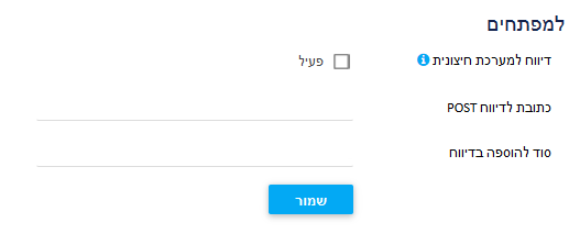
1. Report to an external system must be marked
2. Fill in the address field for POST reporting
3. Secret field to be added in the report (recommended field): a string that will be sent in addition to the parameters of the instruction to confess that it was sent from Cardcom servers.
There are two types of notifications:
1. Alert when creating a debit order. RecordType=MasterRecurring
2. Alert when actual billing or change status of actual billing. DetailRecurring=RecordType
for example:
A user has created a charge instruction for 12 charges for 100 NIS to be paid. You will receive a RecordType=MasterRecurring alert.
After that, for 12 months, you will receive 12 notifications of making a charge of the type DetailRecurring=RecordType.
Recurring payment alert RecordType=MasterRecurring:
The system will issue an alert when:
- Creation of a new instruction.
- Active, inactive/active status change.
Parameters table:
| Description | Possible value for example | Parameter | number |
| Unique customer ID | 123 | AccountId | 1 |
| The number of the recurring payment for the charge you want | 2000 | RecurringId | 2 |
| Recurring payment type | "MasterRecurring" | RecordType | 3 |
| Secret to add in report | "Th3_$1cret" | Secret | 4 |
| Terminal number | 1000 | TerminalNumber | 5 |
| Description name for recurring payment | "refresher course" | InternalDecription | 6 |
| Production date | 01/04/2016 | CreateDate | 7 |
| Last billing date | 10/04/2016 | LastProssesDate | 8 |
| Next billing date | 10/05/2016 | NextDateToBill | 9 |
| Number of payments | 3 | TotalNumOfBills | 10 |
| Charged payments | 2 | NumOfPaymentsAlreadyCharged | 11 |
| Is recurring payment active? | true | IsActive | 12 |
| debit margin | TimeIntervalId | 13 | |
| Billing currency code | 1 - shekel 2 - dollar and more (see types of coins) |
FinalDebitCoinId | 14 |
| Create an invoice | true / false | IsInvoiceCreate | 15 |
| Internal notes (not for the client) | "Paid in cash 200" | Comments | 16 |
| Print payment number | true / fasle | IsPrintNumOfPayments | 17 |
| Department code | 57 | DepartmentId | 18 |
| Agent code | 23 | UserId | 19 |
| IsByProducts | 20 | ||
| Invoice description | "cooking course" | FlexItem.InvoiceDescription | 21 |
| The monthly price to pay Item price / price list |
150 | FlexItem.Price | 22 |
| SKU - item code (if any) | 1000215 | FlexItem.ProductId | 23 |
| whether to make a linkage | true / false | FlexItem.IsLinkTo | 24 |
| Item price with/without VAT true - the customer will be charged the transferred amount and the VAT will be extracted from the summary. (100 will be 100 including VAT) false - VAT will be added on the transferred amount (100 will be 100 + VAT for example 117) |
true \ false | FlexItem.IsPriceIncludeVat | 25 |
| מדד בסיס | 0.0000 | FlexItem.OpenRateForLinkTo | 26 |
| Active cycle renewal | true \ false |
IsReNewOrder |
27 |
| Print for month X | true \ false | IsPrintBillMonth | 28 |
Actual Billing Type Alert DetailRecurring=RecordType .
1. The system will issue an alert when the status of the record changes:
List Status values:
| Value | Description | Num |
| "SUCCESSFUL" | Charged successfully | 1 |
| "PENDINGFORPROCESSING" | Awaiting credit charge | 2 |
| "DEBTAUTOBILLING" | Awaiting automatic billing | 3 |
| "LOSTDEBT" | Manually marked as a bad debt | 4 |
| PAYBYOTHERE | Manually marked as paid by another payment method | 5 |
| "ONHOLD" | Manually frozen | 6 |
| ''OTHER'' | other | 7 |
A complete list of all parameters:
| Description | possible value for example | Parameter | Number |
| Unique customer ID | 123 | AccountId | 1 |
| The recuring payment number you want | 160 | RecurringId | 2 |
| Billing ID | 140 | RowID | 3 |
| Recuring payment type |
"DetailRecurring" |
RecordType | 4 |
| Secret to add in report | "Secret" | Secret | 5 |
| Billing status |
"SUCCESSFUL" |
Status | 6 |
| The billing terminal number | 1000 | TerminalNumber | 7 |
| Production date | 01/05/2020 | CreateDate | 8 |
| Description for the invoice | "Course X" | InvoiceDescription | 9 |
| Last billing date | 10/05/2020 | LastBillDate | 10 |
| Original billing date | 10/05/2021 | OriginalNextDateToBill | 11 |
| Billing currency code | 1 - shekel 2 - dollar and more (see types of coins) |
FinalDebitCoinId | 12 |
| Department code | 55 | DepartmentId | 13 |
| Do create an invoice |
true / false |
IsInvoiceCreate | 14 |
| Agent code | 55 | UserId | 15 |
| tax payment' | 2 | PaymentNum | 16 |
| Active cycle renewal |
true / false |
IsReNewOrder | 17 |
| Item code - SKU | 652 | ProductId | 18 |
| Document type as above | 1 - "Receipt invoice" | DocumentType | 19 |
| Document number. It will not always be accepted, because the invoice for the recurring payment is issued one hour late in Drakal. Reports of documents must be connected separately |
22 | DocumentNumber | 20 |
| Quantity | 1 | Quantity | 21 |
| Does it include VAT | true / false | IsIncludesVAT | 22 |
| VAT | 0.17 | VAT | 23 |
| Actual decimal billing amount | 125.50 | Sum | 24 |
| Amount to be charged without VAT |
110.50 |
SumNoVat | 25 |
| Credit card billing number |
88365478 (int64) |
InternalDealNumber | 26 |
| Answer code from the credit company | 0 | ResposeCode | 27 |
| Billing process number | 1 | ProcessID | 28 |
| Number of billing attempts | 1 | BillingAttempts | 29 |
| Credit/bank payment method |
BankOrder \ CreditCard |
ActualBillingType | 30 |
| Return value - transferred when creating an instruction in the interface or manually editing a debit instruction | String 50 | ReturnValue | 31 |
Log checks for third party reports:
You can check the reports here:
In recurring payment - charge history report
You can add fields by - interfaces - answer interface in the selector

In recurring payment - permanent debit registration report
You can add fields by - interfaces - answer interface in the selector
To translate the report, you can use this website:
https://meyerweb.com/eric/tools/dencoder
Test sites for WEBHOOK reports: