Low profile interface - EN (Step 1 +2)
Unified API for Redirect or IFRAME billing form( API 10)
if something is not understood, you can call our support for help at 03-9436100 and press 2 for developer support, or through mail: dev@secure.cardcom.co.il
this API is suitable for:
1. online store with cart, when the cart is managed by the developer and the checkout page is cardcom.
if its a closed platform like woo-commerce, go to this woo commerce article
2. online store with products and dynamics prices
3. if there is no cart on the site, you should use ishurit page
The API allows you
-
-
- Billing credit card.
- Billing and creating a token - token is used for recurring billing.
- Create token- use for token creation without billing the credit card.
- Suspended deal- allows to suspend the credit card charge and to charge it in the cardcom website interface in a later date.
-
API 10 Web Service
the web service adress is: https://secure.cardcom.solutions/Interface/BillGoldService.asmx
you should use function CreateLowProfileDeal
API JSON (more dynamic)
JSON address is: Create a new Iframe \ Redirect page
API Name to Value (more common)
Name to Value address is: https://secure.cardcom.solutions/Interface/LowProfile.aspx
Important notes Name to Value:
Request must be made in POST action.
All the valuesmust be URL encoded
Key
Red parameter - must
bold parameter - recomended
not red or bold - optional
Step 1: Request for open a payment page (low profile page)
the Name To Value adress is: https://secure.cardcom.solutions/Interface/LowProfile.aspx
| Number | Parameter | possible values for example | Description |
| 1 | Operation |
1- charge only |
the number of operation that our system need to perform.
|
| 2 | TerminalNumber | 1000 | the internal terminal (not shava) that does the operation |
| 3 | UserName | MyTestUser | API user name |
| 4 | SumToBill | 100.50 | the amount you want to charge |
| 5 | CoinId |
1- shekel |
Billing coin see also additional coins additional coins |
| 6 | Language |
he - Hebrew |
see also another language. |
| 7 | ProductName | order number: C101G |
product name to display the user, max length of 50 chars. |
| 8 | APILevel | 10 | API version, last version 10 |
| 9 | Codepage | 65001 | this parameters shows the unicode type |
| 10 | MaxNumOfPayments | 12 | max number of payments that the user can select, also there is payments setting to the terminal that can override the developer settings. website gradation payments (low profile) |
| 11 | MinNumOfPayments | 3 | min number of payments that the user can select |
| 12 | HideCreditCardUserId | false | hide user ID |
| 13 | SuccessRedirectUrl | http://www.site.com/Success.html |
The page that the card owner will be redirected to after a successful deal |
| 14 | ErrorRedirectUrl | http://www.site.com/Error.html |
The page that the card owner will be redirected to after a failed deal |
| 15 | IndicatorUrl | http://www.site.com/hide.aspx |
Hidden page (report page receiving transaction details) for details of the transaction. The system calls this page before the customer is taken to the Success / Failure page. |
| 16 | HideCVV | false |
Hide CVV input box from form |
| 17 | CreditTipe |
1 - Regular billing |
Notes for Payment in Credit : |
| 18 |
ReturnValue |
AA-1234 | Value to transfer to the clearing system to be returned on the success page / INDICATOR. Up to 250 characters. (It is customary to transfer a reservation number from a reservation system on the site) |
| 19 | DefaultNumOfPayments | 10 | the default number of payment the the user will see |
| 20 | CardOwnerName | Eli Cohen | the name of the card owner |
| 21 | HideCardOwnerName |
String: true = hide |
hide card owner name |
| 22 | SapakMutav | 1234 | code ravmutav |
| 23 | RefundDeal | true | do a refund deal - active on Operation billing only |
| 24 | ShowCardOwnerPhone | true | show card owner phone text box |
| 25 | CardOwnerPhone | 0548976523 | the card owner phone |
| 26 | ReqCardOwnerPhone | false |
is card owner phone text box required |
| 27 | CardOwnerEmail | eli1960@gmail.com | the card owner mail |
| 28 | ShowCardOwnerEmail | true |
show card owner email text box |
| 29 | ReqCardOwnerEmail | true |
is card owner mail text box required |
| 30 | ShowInvoiceHead | true |
Show and allow Edit of all InvoiceHead Information to the card owner |
| 31 | AutoRedirect | true |
in test mode AutoRedirect = true. |
| 32 | InvoiceHeadOperation |
0 - dont create and dont show invoice Default |
if you dont want to create invoice, and just display invoice details, you need to pass this param with value 2 |
| 33 | IsVirtualTerminalMode | true |
Is it a clearing of the business house? |
| 34 | IsOpenSum | true | the param works only if IsVirtualTerminalMode = true allow the dealer to update the amount when billing |
| 35 | ChargeOnSwipe | true = In a magnetic stripe a straight charge will be made | When transmitting a magnetic stripe (Channel 2) the billing straight will be performed. |
| 36 | DocTypeToCreate |
1- Receipt tax invoice |
Not required, it is recommended not to transfer, the system alone knows which document to produce according to the settings defined at the terminal level. |
| 37 | CSSUrl |
https://www.site.co.il/mycss.css |
The url of the css code that the system will add to the payment page. The support confirmation must be requested to pass this parameter. |
| 38 | IsAVSEnable |
City, Adress, Zip code |
Display AVS fields to the card holder on the payment page. |
| 39 | deferMonths |
1 - a month ahead (current 30) |
Number of months the transaction was postponed, current 30 + 60, etc Approval from the credit companies is required to transfer this parameter. |
| 40 | FirstPayment |
First Payment |
In a payment transaction, the programmer wants to define a number of payments in advance where the first payment is higher than the other payments |
| 41 | ConstPayment |
Fixed payment |
The payment is fixed, first payment + fixed For example, a transaction of NIS 100 (must transfer DefaultNumOfPayments). Number of payments = 3 (DefaultNumOfPayments) First payment = 50 (FirstPayment) Constant Payment = 25 (ConstPayment) [Not displayed on the actual payment page but performed server side in the transaction Hide the display element of the payments split on the page] |
another optional params for operation 2-create and charge token, 3-create token only
| Number | Parameter | possible values for example | Description |
| 39 | CreateTokenDeleteDate |
01/01/2025 |
When to remove the token and the card number for cardcom system |
| 40 | CreateTokenJValidateType |
2- J2 validate |
type of test to be performed on the card while creating token |
additional optional params for operation 4 - suspended deal
| Number | Parameter | possible values for example | Description |
| 41 | ResponseCode | 0 - OK else a developer error |
response code |
| 42 | Description | OK | response code description |
| 43 | LowProfileCode | 8b0fd17a-d103-4c18-ab3b-f9c0f24f57f8 | unique code for this deal. you need to save it in your data base on the order for futer user query |
| 44 | Url | https://secure.cardcom.solutions/SomePage.aspx | the url adress to redirect or to iframe to the card owner |
| 45 | PayPalUrl |
כתובת url להעברת הלקוח ישירות לPAYPAL - מתאים להוספת לחצן באתר "רכישה PAYPAL" ישירות מבלי לעבור דרך דף הסליקה של קארדקום - שים לב יש לבצע הגדרות של PAYPAL במסוף. |
|
| 46 | SuspendedDealJValidateType | 2- J2 validate 5- J5 validate |
Type of test to be performed on the card
J2- Testing card number validation |
| 47 | SuspendedDealGroup | 0 | Group code - used to display in the CardCam back office |
Adding parameters to create an accounting document according to this guide:
The answer received:
| parameter | Possible values for example | Description | |
| 1 | ResponseCode | 0 | 0 - OK, otherwise wrong - development error. |
| 2 | Description | OK | Description of the answer, if received is different from 0, you must register and notify the system administrator. |
| 3 | LowProfileCode | f47b241e-1861-4cf8-a9a2-bf0c05f9f36d |
Low profile code - the unique identifier code of the transaction. This code must be saved on the order in the database |
| 4 | url | https://secure.cardcom.solutions/External/lowProfileClearing/1000.aspx?LowProfileCode=f47b241e-1861-4cf8-a9a2-bf0c05f9f36d | Address in the URL of the generated page to which the cardholder must be transferred for clearing. |
| 5 | PayPalUrl | https://secure.cardcom.solutions/External/LowProfileRedirectToPayPal.aspx?TerminalNumber=1000&LowProfileCode=f47b241e-1861-4cf8-a9a2-bf0c05f9f36d | URL for transferring the cardholder directly to PAYPAL - suitable for adding a button on the "PAYPAL purchase" website directly without going through the Cardcom clearing page - note that PAYPAL settings must be made in the terminal first. Mainly suitable for working with IFRAME |
| 6 | BitUrl | https://public.bankhapoalim.co.il/bitcom/2.2.1/payment-modal?&transactionSerialId=FA9F5BB4-AF8B-4B62-8A03-D0D27C652435&eventSerialId=D2AA7F7A-5305-4438-8F66-FDB2BCCCDA76 | A URL to transfer the cardholder directly to the BIT website for payment |
step 2
[Acceptance or withdrawal of a response from the clearing server]
After withdrawing the data, it should be marked in your system that the data has been withdrawn, in order to avoid the problem of repeated withdrawals of the transaction.
there are cases that the clients Browse the same success page again or refresh the page. Which can lead to duplication of transactions and orders in your system. If the data is marked continued, do not withdraw again.
Web Service
the web service adress is: https://secure.cardcom.solutions/Interface/BillGoldService.asmx
the function you should use is: GetLowProfileIndicator
Name To Value
the Name To Value adress is: https://secure.cardcom.solutions/Interface/BillGoldGetLowProfileIndicator.aspx
Notes Name To Value:
you should do UrlNCode for all the values that transfered to the system.
in order to know if the transaction is correct you should use params OperationResponse=0
A zero value means correct.
acording to the type of billing performed, You can check the appropriate parameter:
1. In order to check if Biling is ok, you should check the parameter: DealResponse
2. In order to check if Creating A Token is ok, you should check the parameter: TokenResponse
3. In order to check if Creating Invoice is ok, you should check the parameter: InvoiceRespondCode
4. In order to check if Creating Suspended Deal is ok, you should check the parameter: SuspendedDealResponseCode
notes:
1. Parameters in red are always passed, The other parameters are passed only if they exist in the system, For example, if no token request is made, token-related parameters will not be passed.
2. In addition to these parameters, parameters of the credit card companies are added, see chart down below
3. The parameters are passed in HTTP GET To a page set in the form of http://www.site.com/Indicator.aspx?termianlnumber=1000&lowprofilecode=aa-bb-cc....Operation=1
4. When receiving an answer to create a token, The token-related parameters should be stored in the database as indicated in the table chart below.
5. It is recommended to keep all the data obtained in this answer in the database.
addressing Parameters table
| Number | Parameter | possible values for example | Description |
| 1 | TerminalNumber | 1000 | the terminal that does the operation |
| 2 | UserName | APIUserName | API user name |
| 3 | LowProfileCode | AA-BB-CC | unique code for this deal. you need to save it in your data base on the order for futer user query |
| 4 | codepage | 65001 | this parameters shows the unicorn type |
Example for addressing in Get
https://secure.cardcom.solutions/Interface/BillGoldGetLowProfileIndicator.aspx?terminalnumber=1000&username=APIUserName&lowprofilecode=AA-BB-CC
Parameters table, answer reciving
| Number | Parameter | possible values for example | Description |
| 1 | TerminalNumber | 1000 | The internal terminal (not shava) that does the operation |
| 2 | LowProfileCode | 5BAF4BD5-76FB-4C81-8654-DF481B22EDF3 | Unique code for this deal. you need to save it in your data base on the order for futer user query |
| 3 | Operation |
1- charge only 2 - cahrge and creating token 3 - create token only 4 - suspended deal |
The number of operation that our system need to perform.
|
| 4 | ProssesEndOk | Internal parameter of the system, not for external use! | Process answer code |
| 5 | OperationResponse |
0- Success |
Did the billing work |
| 6 | DealResponse | 0- Success 3- Refusal 4- Stolen |
Credit Card Billing Answer Code - Transmitted only if a credit card has been debited |
| 7 | InternalDealNumber | 654354685 | A unique number of a transaction made while charging.The size of the answer can be Int64/ BigInt |
| 8 | TokenResponse | 0- Correct, otherwise wrong | Token response code |
| 9 | Token | 12F678C4-BC08-4607-ACF2-755FD7FCD3DE | Token number, must be stored in the database |
| 10 | TokenExDate | YYYYMMDD | Token validity, must be stored in the database. |
| 11 | CoinId | 1- Shekel 2 -USD |
Currency code executed |
| 12 | CardOwnerId | 012345678 | Card holder ID, must be kept in the database. |
| 13 | CardValidityYear | 2021 | The validity of the year card, when creating a token, must be saved in the database. |
| 14 | CardValidityMonth | 12 | The validity of the card-month, when creating a token must be saved in the database. |
| 15 | TokenApprovalNumber | 12345 | A one-time approval number obtained when creating a token with a J5 check. When creating a token, it must be stored in the database in order to make a future charge for the transaction. |
| 16 | SuspendedDealResponseCode | 0- Correct, otherwise wrong | Response Code for Suspended Deal |
| 17 | SuspendedDealId | 1234 | Suspended Deal number |
| 18 | SuspendedDealGroup | 90 | Group of Suspended Deals |
| 19 | InvoiceResponseCode | 0- Success | Invoice creation response code |
| 20 | InvoiceNumber | 555 | Invoice number |
| 21 | InvoiceType | 1 - billing invoice 2 - Refund invoice 3 - Receipt 4 - Customer refund (Refund receipt) |
Document type to creeate |
| 22 | CallIndicatorResponse | ok | Description of the response from your server when calling - IndicatorUrl |
| 23 | ReturnValue | 1234 | The value as transferred when creating a billing request |
| 24 | NumOfPayments | 3 | Number of payments the customer selects |
| 25 | CardOwnerEmail | eli@gmail.com | Card holder Email |
| 26 | CardOwnerName | Eli Cohen | Card holder name |
| 27 | CardOwnerPhone | 0508855881 | Card holder phone |
| 28 | AccountId | 1001 | A customer number in the system, only if a customer card has been created or merged. |
| 29 | ForeignAccountNumber | 21451 | Customer accounting number, only if a customer card has been consolidated or executed. |
| 30 | SiteUniqeId | 1005412 | A unique customer ID number, only if a customer card has been created or merged. |
In addition to these parameters there are other parameters:
Parameters table, Data reciving from credit companies
In addition to the internal data of the clearing system, when making a credit charge there are additional data which are obtained directly from the credit company.
Notes:
1. The parameters are transferred only if they exist in the system and there was an addressing for credit companies.
2. The parameters are dynamic, additional fields may be added in the future.
| Number | Parameter | possible values for example | Description |
| 1 | ExtShvaParams.Status1 | According to the code message table 0-300, Caution ! There are codes that are different from 0 but still say a normal deal! | Answer code - Credit companies |
| 2 | ExtShvaParams.Sulac25 | Credit company codes according to the article: credit companys code | Credit card company |
| 3 | ExtShvaParams.CardNumber5 | 4580 | Last four digits of the customer credit card |
| 4 | ExtShvaParams.JParameter29 |
|
J - Parameter, type of test to be performed on the card |
| 5 | ExtShvaParams.Tokef30 | 1229 | Card validity |
| 6 | ExtShvaParams.Sum36 | 150 | The amount a customer paid in pennies - in the same currency - does not have to be nis |
| 7 | ExtShvaParams.SumStars52 | 100 | Amount paid in stars |
| 8 | ExtShvaParams.ApprovalNumber71 |
0 - without approval number, |
Approval number about making a transaction |
| 9 | ExtShvaParams.FirstPaymentSum78 | 50.00 | The first payment amount |
| 10 | ExtShvaParams.ConstPayment86 | 20.00 | The amount of the number of additional payments |
| 11 | ExtShvaParams.NumberOfPayments94 | A standard transaction of 6 payments will appear 5 Notice! when ExtShvaParams.CreditType63=6 A transaction of 6 payments will appear 6. |
The number of additional payments that will be charged. |
| 12 | ExtShvaParams.CardTypeCode60 | Credit company codes according to the article: credit companys code | Code of the issuing credit company |
| 13 | ExtShvaParams.Mutag24 | 0 - Private card of an issuing company(PL) 1 - Mastercard 2 - Visa 3 - Maestro 5 - Isracard |
Card brand code |
| 14 | ExtShvaParams.CardOwnerName | Yaniv | Name of card holder as typed by the payer |
| 15 | ExtShvaParams.CardToken | AA-BB-CC | Card token if created of type GUID |
| 16 | ExtShvaParams.CardHolderIdentityNumber | 040000000 | Card owner ID |
| 17 | ExtShvaParams.CreditType63 | 1- Regular 2 - Isracredit, 30+ 3 - Immediate charge 4 - Club credit 5 - Super Credit 6 - Credit payments 8 - Payments 9 - Payments club. |
Type of credit charge |
| 18 | ExtShvaParams.AbroadCard119 | 0 - Israeli card 1 - Tourist card 2 - Fuel card 3 - Debit card 4 - Gift card |
Credit card type |
| 19 | ExtShvaParams.DealType61 | 00 - Card blocked 01 - Charge 02 - Approved charge 03 - Forced chrged 51 - Refund 53 - Approval refund |
Transaction type |
| 20 | ExtShvaParams.ChargType66 | 00 - Charge 01 - Self service 02 - Gas station self service 05 - contactless 06 - contactless self service 50 - Telephone transaction 51 -Signature transaction only. |
Transaction code |
| 21 | ExtShvaParams.BinId | 1- shufersal credit card (4580XX44) 2 - hever credit card 185000000 - 195000000 |
Card type ID. If there are additional cards to identify, please contact our support to add |
| 22 | ExtShvaParams.InternalDealNumber | 123456 | Cardcom internal deal number - int64 |
| 23 | ExtShvaParams.CouponNumber | 120112011 | Cuppon number - string |
| 24 | ExtShvaParams.DealDate | Date of transaction | |
| 25 | ExtShvaParams.CardOwnerPhone |
Card owner phone |
Custom fields API 10
| Number | Parameter | possible values for example | Description |
| 1 | CustomFields.Field1 | shipping address | CustomField 1 |
| 2 | CustomFields.Field2 | City for delivery | CustomField 2 |
| 3 | CustomFields.Field3-25 | Value up to 50 chars | CustomFields 3-25 |
Flow chart :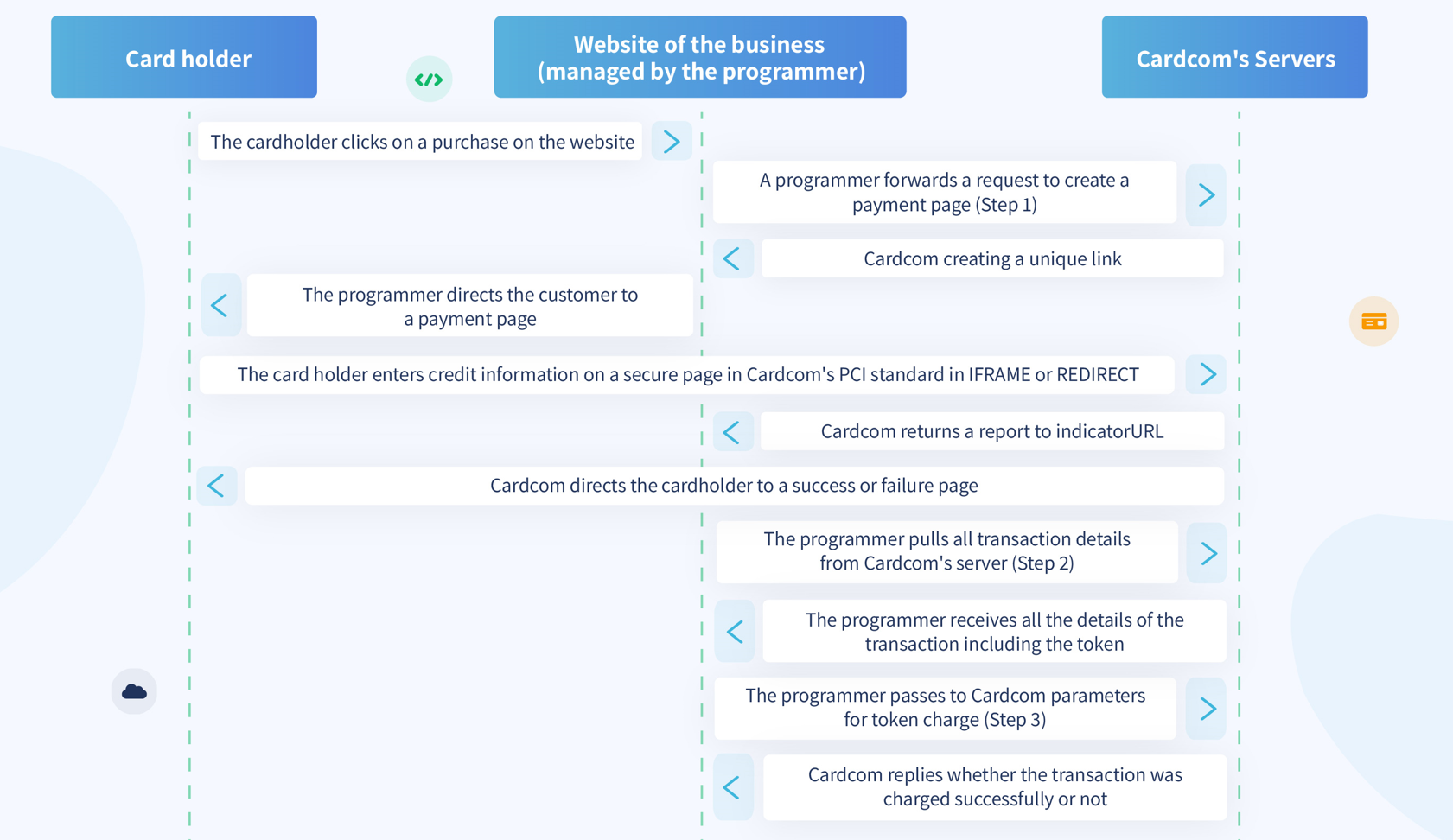
.Additional information fields can be sent to the system which will be saved in the clearing system
These fields will appear in the system reports, there is no need to preset these fields in the clearing system.
These fields can only be submitted on Low Profile page.
Maximum field length is 50 chars.
Settings can be made in the management system, whether to display these fields to the card holder so that he can edit them. (Settings -> Low Profile Page -> Custom Fields)
web service
There is a department called CustomFields Which contains 25 fields. Additional data must be passed through this department.
HTTPS POST
There are 25 fields, the last field in the series is CustomFields25
The appropriate fields should be added as follows:
Codes For Example