Transferring parameters to the Cardcom billing page 4
explanation
The goal is to produce a dynamic landing page for payment by transferring external parameters into the page (full table down below).
for example:
Updating the price of the product/service or any other characteristic (each parameter is a characteristic that appears on the purchase page like a product description)
We will use the address (URL) of the page, all the properties (parameters) go into the page using the GET method:
https://secure.cardcom.solutions/e/esT/?sum=70&description=online courses
How to use
On Cardcom's billing page (version 4 and later), we will use name to value = values entered in the address bar in the browser.
Step 1 - Displaying a link (URL) to the clearing page
Current activity -> 4.Creating a Cardcom payment page
On the payment page list screen, select the burger button (which appears to the left of the pencil button), and then select "Edit Items" in the panel menu:
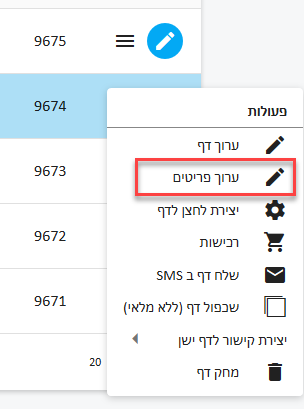
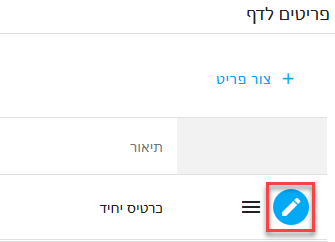
To edit a specific item, click on "Edit" in an existing item or "Add a new item" (if no item exists)
Editing/creating a new item screen - and marking an open amount with V. (It is not possible to mark an open amount in multiple selection)
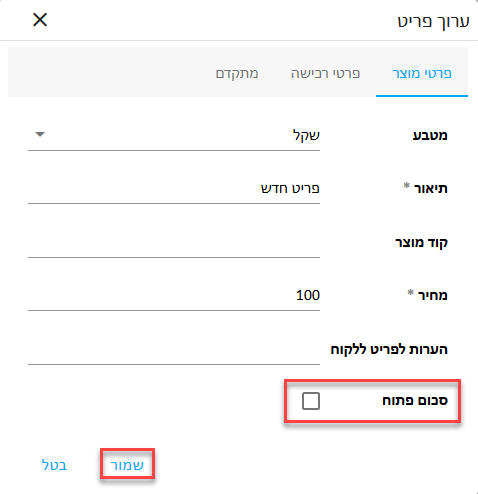
To finish and save the data, click on "Save" that appears on the lower left.
In order to get to the page address (and perform a chain of parameters) we will close the items window for the page.
On the billing pages screen - a list of payment landing pages
Click on the link that appears in the left-most preview column to view the address (URL) of the clearing page.
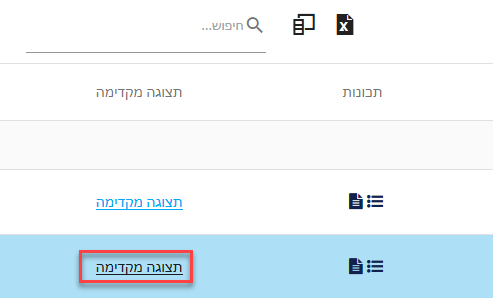
On top of the browser itself - the web address of the page will appear at the top of the address bar.
If necessary, we will copy (CTRL+V) and paste to share the page as part of a text message, WhatsApp, Facebook or a landing page from which cardholders can pay.

Creating a payment page dynamically
You can use copy (CTRL+C) paste (CTRL+V) to view an example
https://secure.cardcom.solutions/e/esT/?sum=1000&description=books
The parameters: sum + description are mandatory
Immediately after the page address (appears in blue on the right side of the address) we will add a question mark and then the inscription sum=1000 in order to set the cost of a product/service to one hundred shekels or any other amount chosen - among the parameters we will add & (SHIFT+7). The description parameter contains the value books (describes the product for purchase)
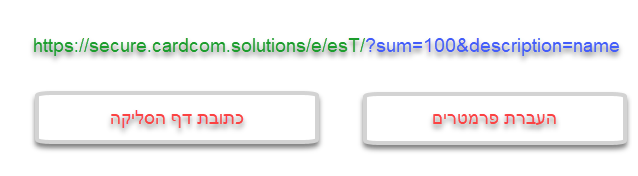
Table of page properties (parameters)
| Value for example | Description | Parameters | # |
|
https://www.your.page/NotifyURL.php |
Third party server address for transaction reporting | NotifyURL | 1 |
| 012345678 | ID / business ID of the invoice recipient | ExtCInvoiceUserID | 2 |
|
avi@gmail.com |
Purchaser's email address | /ExtCUserEmail subscribers_email |
3 |
| In honor of Eli Cohen | In honor of whom the document was issued | /ExtCInvoiceTo subscribers_name |
4 |
| 050-0000000 | mobile number | /ExtMobilPhone subscribers_phone |
5 |
| Tel- aviv | A city for the invoice | ExtCInvoiceCity | 6 |
| Ha-Histadrut | Street for the invoice | ExtCInvoiceStreet | 7 |
| 54214 | Zip code for invoice | ExtCInvoiceZipCode | 8 |
|
You can move custom_field_01 up to custom_field_19 Even fields that are not displayed to users are saved as parameters and can be returned directly to a third party |
Custom fields | custom_field_01 | 9 |
| 1234 |
Affiliate Group ID transfer The group number to transfer to the mailing system - numbers only |
AffiliateGroupID | 10 |
| 1 |
Transferring the number (ID) of the department to which we will associate the document (Department number for the document according to the list of departments in the system) |
DocumentDepartment | 11 |
| YYYABC12 |
Additional information returning to the server side on the page - Success/ Preselected page for third party reporting. For example: transferring an affiliate ID to the affiliate system A string of up to 250 characters |
ReturnData | 12 |
| For example - The institution has income tax approval No. 580000000 regarding donations according to section 46 of the ordinance |
Notes to the document - a short text to add to the invoice. | DocumentComments | 13 |
| 1 | Setting the minimum possible payments on the page | MinNumOfpayments | 14 |
| 12 | Setting the maximum possible payments on the page | MaxNumOfPayments | 15 |
| 1234567 | For VIP PLUS customers, a unique ID of a contact (externalId) | q | 16 |
| https://secure.cardcom.solutions/SuccessAndFailDealPage/Success.aspx | Referral page when completing the transaction successfully | SuccessRedirectUrl | 17 |
| https://secure.cardcom.solutions/SuccessAndFailDealPage/Fail.aspx | דף הפניה בעת עסקה שלא הושלמה (כישלון עסקה) | ErrorRedirectUrl | 18 |